Algo Fantasy builds its own sheet. There is nothing to copy and no template to download.
- Install the add-on. Install Algo Fantasy Basketball from the Google Workspace Marketplace.
- Open a blank Google Sheet. Any new sheet in your Google Drive.
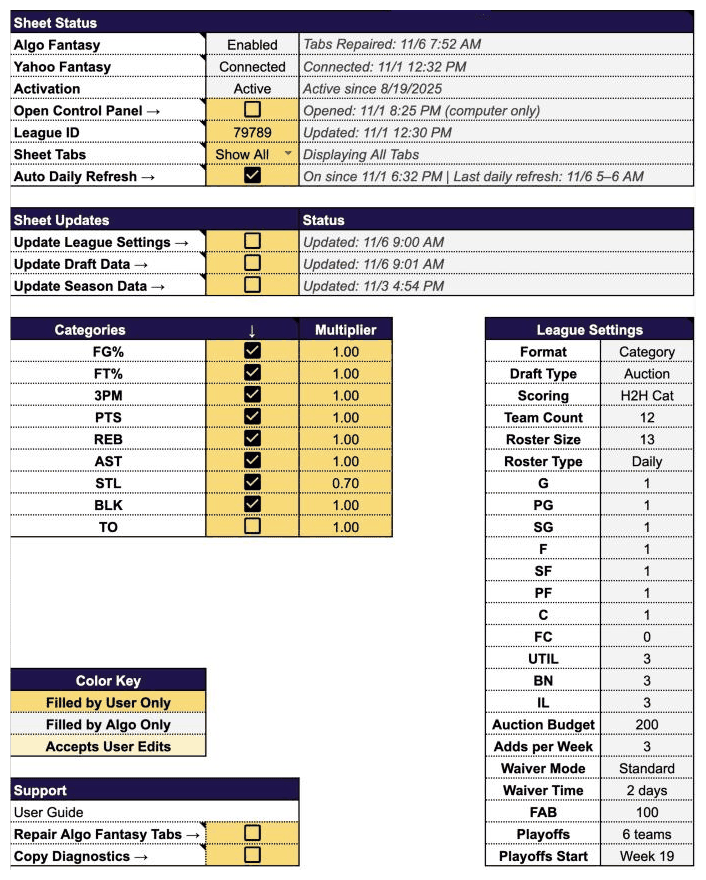
- Build the tabs. Extensions → Algo Fantasy Basketball → Create / Repair Algo Fantasy Tabs. About a minute later every tab is there and Setup is open.
- Enter your league. On Setup, paste your Yahoo league ID, your league URL, or a mock draft lobby URL into the yellow League ID cell. The sheet reads the ID out of it.
- Connect Yahoo Fantasy. Extensions → Algo Fantasy Basketball → Connect Yahoo Fantasy, then sign in to Yahoo in the tab that opens. Setup's Yahoo Fantasy row shows Connected.
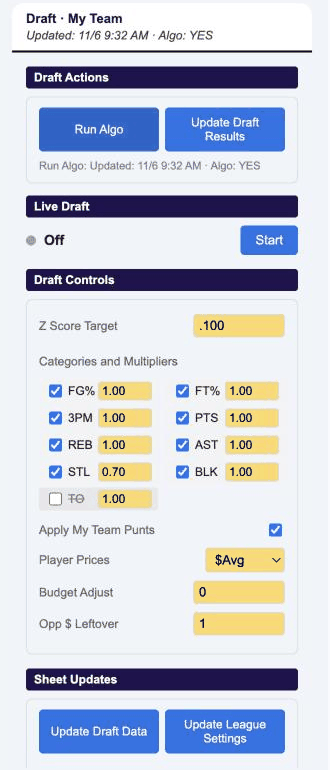
- Load your league. Tick Update League Settings, then Update Draft Data on Setup (or use the buttons in the Control Panel). Your roster settings, categories and the full player list with Yahoo prices and projections are now in the sheet.
- Open the Control Panel (Extensions → Algo Fantasy Basketball → Open Control Panel, or tick Open Control Panel on Setup; computer only) and press Run ALGO. Read the Guide for what to do with the result.
Every control in the sheet is a checkbox, so the sheet itself works from the Google Sheets phone app; the Control Panel sidebar is desktop only for now.